
User:Px79/Prototypes/EfficientTagging
About this tutorial
Transcribed and adapted from Peter Albrecht's article at www.digikam.org, 21 January, 2012
In the two years, the author is using digikam at the time of writing this article, he always searched for a way to tag the persons on his photos in a fast and easy way.
The batch-click way
How-To
- switch to thumbnail view (you have to be able to select more than one image)
- shift the preview size to the maximum of 256 pixel (you want to be able to recognize the people on the photos)
- switch the right side-view to Caption/Tags and select the tab Tags
- select picture number one and look at the leftmost person on this picture
- hold CTRL down and select all other pictures, showing this person
- search for the corresponding tag in the right side-view, select it and apply (you can enable do not confirm when appying changes from right sidebar in digikam settings Miscellaneous to get rid of the Save Changes?-Dialog.
- if there are more persons in picture one, then select this picture again go to step 5, while looking for the next leftmost person.
- if you have all the persons in picture one, select picture two and look again for the leftmost person, you have not tagged yet, and go to step 5. (toggling the button
 in the lower right corner of the Tags tab, is very useful here)

This way you go through all your pictures. In the beginning you have to tag a lot of people, but coming to the last pictures, most people will already be tagged and you can fast jump to the next picture.
Usability
This process is good, if you have a high number of photos proportional to the amount of different persons. If you have lots of different tags in your database, it's worth to think about substituting step 6 with the keyboard way, which is coming up next.
The keyboard way
There is a famous bug-report at BKO According to it's number of 127 comment posts, it is the most impressive bug report, the author has ever seen.

How-To
And that's the way you go:
- select an album
- switch to View Image-view (the bigger the picture, the better you can recognize the people, you want to tag)
- switch the right sideview to Caption/Tags and select tab Tags
- click in the uppermost input box, which shows the text: Enter new tag here... (see the red rectangle in the following screenshot)
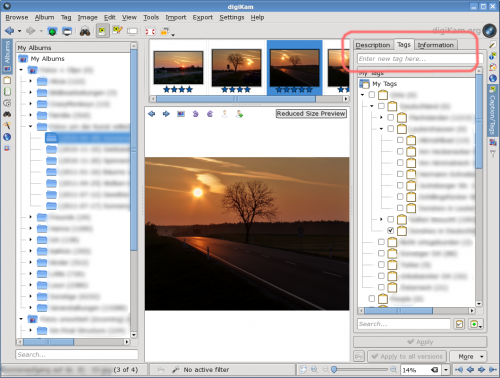
- look for the leftmost person, you have not tagged yet
- start typing a few letters of the desired tagname (You have to start with the first letters in your tag name. There is no "mid word matching".) You will see a list of possible tags appear, that shrinks with every letter you add to the input box
- if the list is reduced enough, use TAB to select the desired tag from this list
- hit ENTER to assign this tag to your picture
- if there are more persons, you want to tag, go to step 5 again
- if all persons on this image have been tagged, hit PAGE_DOWN to go to the next image and resume with step 5

Keyboard focus will always stay in the tag input box. So you can keep your hands on the keyboard all the time and tag very fast. As mentioned above, you can enable do not confirm when appying changes from right sidebar in digikam settings to get rid of the Save Changes?-Dialog.
Usability
This process is most useful, if you have a high number of different persons proportional to the amount photos. And especially steps 6 to 8 are very handy, if you have lot of tags, you don't want to scroll through by hand.
Keyboard shortcuts for specific tags
If you have certain tags, you use very often, you can assign a keyboard shortcut to it. I did this with "places/myHome", which is assigned to CTRL + SHIFT + H.
But there is already a nice tutorial at: Scribbles And Snaps (Transcribed here to Assign Keyboard Shortcuts to Tags in digiKam)
So I'll keep this section short. 
Some stats about the primary author's digikam usage
To get a relation for phrases like "lots of tags", here some numbers:
- 206 different tags (in multilevel-hierarchical order: places, people, other)
- 24,580 tag assignments (assigned in the last 2 years)
- 25,687 pictures in digikam database (collected in 10 years)
The author was using digikam 2.5.0 at the moment of writing, but the features mentioned above have been introduced in earlier version. If you are curious about, just have a look at the corresponding NEWS-file in the git repository: DigiKam git repository, e.g.: What's new in DigiKam 2.0.0
Final words
Since the keyboard method is new to the primary author, he can't tell about long term experience. But chances are high that the most efficient way of tagging will be a mixture of the three methods mentioned above, depending on the situation.