
Systemeinstellungen
System Settings
Kontrollzentrum für KDE Software und Arbeitsplatz

Funktionen
- Kontrollzentrum für globale KDE Plattform Einstellungen
- Anpassen und Verwalten Ihres Desktops an einer Stelle
- Suchfunktionen helfen beim besseren Finden von Einstellungen
- Wenn Sie auf ein Symbol zeigen, wird ein Infofenster mit mehr Informationen angezeigt
Suche
Wenn der Tastaturfokus auf dem Symbolfenster ist, können Sie die ersten paar Buchstaben eines Symbols eingeben, um es auszuwählen.
Systemeinstellungen hat eine Suchfunktion, um eine Einstellung besser zu finden. Tippen Sie einfach ein Stichwort in das Suchfeld in der Werkzeugleiste ein und Systemeinstellungen wird Ihnen entsprechende Module anzeigen, die das Stichwort enthalten und Module ausblenden, die es nicht enthalten.
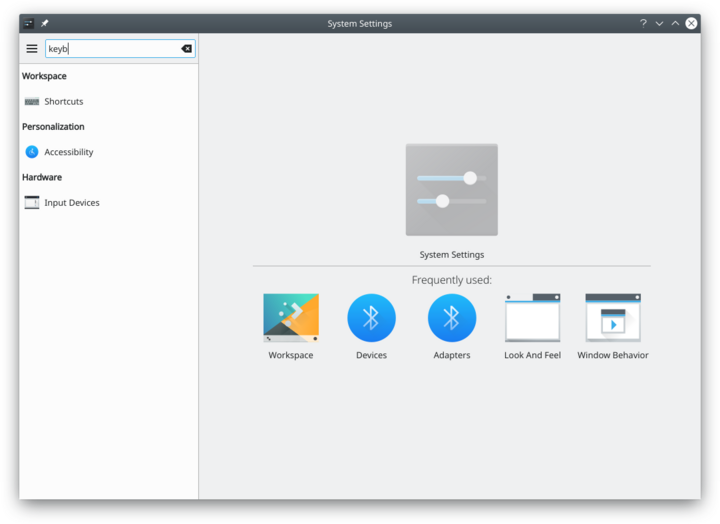
Suche nach "key".

You can also search for and open System Settings modules in KRunner.
Kategorien
Gemeinsame Darstellung und Verhalten
Look and Feel

Customize Plasma in one click. {{{3}}}
[[File: Persönliche Informationen
|48px|link=Special:myLanguage/System Settings/Workspace Theme]]||Konfigurieren Sie Ihre Benutzerinformationen, Kennwort und Pfade. Sie können ebenso Ihren Sozialen-Desktop-Anbieter einstellen.
{{{3}}}
[[File: Erscheinungsbild von Anwendungen
|48px|link=Special:myLanguage/System Settings/Color]]||Konfigurieren Sie Ihr Programm Style, Farben, Symbole, Schriftarten und Smileys.
{{{3}}}
[[File: Anwendungs- und Systembenachrichtigungen
|48px|link=Special:myLanguage/System Settings/Fonts (Category)]]||Passen Sie hier Ihre Zeichensätze an, die Ihr System verwendet.
{{{3}}}
[[File: Dateizuordnungen
|48px|link=Special:myLanguage/System Settings/Icons]]||Here you can choose which icon theme to use for your workspace, and how large you want them to be.{{{3}}}
[[File: Regionales
|48px|link=Special:myLanguage/System Settings/Application Style]]||Customize your systems widget style (button themes), window decorations (how your titlebars look), and how GNOME (GTK) applications look..
Erscheinungsbild und Verhalten der Arbeitsfläche
{{{3}}}
[[File: Arbeitsflächen-Effekte
|48px|link=Special:myLanguage/System Settings/Desktop Behavior]]||Configure desktop effects such as window animations, transparency, or the desktop cube.Windows Management

Configure Kwin the KDE windows manager. Shortcuts

Configure keyboard shortcuts. {{{3}}}
[[File: Starten und Beenden
|48px|link=Special:myLanguage/System Settings/Startup and Shutdown]]||Configure your system behavior when starting up or shutting down.{{{3}}}
[[File: Desktopsuche
|48px|link=Special:myLanguage/System Settings/Search]]||Settings for the desktop search engine and the file indexer.
Personalization
Acccount Details

Manage users and configure password manager. Regional Settings

Configure language, time formats, date and more Notifications

Configure notifications. Applications

Configure default applications, file associations, and more. {{{3}}}
[[File: Zugangshilfen
|48px|link=Special:myLanguage/System Settings/Accessibility]]||Settings to help users who have difficulty hearing audible cues, or who have difficulty using a keyboard.Online Accounts

Add your google, ownCloud or Twitter account, for a better integration.
Netzwerk und Verbindungen
{{{3}}}
[[File: Netzwerkeinstellungen
|48px|link=Special:myLanguage/System Settings/Connections]]||Preferences for your network connections.Settings

Additional settings about your connection, Konqueror and SMB shares Bluetooth

Preference about Bluetooth.
Hardware
Eingabegeräte

Konfigurieren Sie Ihre Tastatur, Maus und Joystick. {{{3}}}
[[File: Anzeige und Monitor
|48px|link=Special:myLanguage/System Settings/Display and Monitor]]||Configuration of your monitor(s) and screensaver settings.Multimedia

Configure the handling of audio CDs Energieverwaltung

Global settings for the power manager. Printers

Configure your printers to work with plasma. Removable Storage

Configure automatic handling of removable storage media and which actions are available when a new device is connected to your machine.